

News and Insights
.webp)
I Built My Own AI Agent. Here's Why
Lately, I’ve been hearing more and more about people building their own AI agents to handle simple, everyday tasks. It got me thinking. Instead of just reading about it, I wanted to see if I could build something useful for myself. At the same time, I wasn’t interested in giving an AI tool access to my email or any sensitive financial information. So I started thinking about a problem I deal with regularly that didn’t require that level of access.
The first thing that came to mind was my credit cards.
And yes, I have too many of them. Between business expenses, personal spending, and travel, things have become more complex than I’d like. At some point, the cards start to feel less like a clean system and more like a collection of coupon-book benefits that are easy to forget about.
For example, I currently carry both the Chase Sapphire Reserve and the American Express Platinum. Between the two cards, that’s over $1,500 a year in annual fees. As a financial advisor, I spend a lot of time helping clients make sure they’re actually getting value from things they pay for, and I apply that same standard to myself. If you’re not intentionally using the benefits, it becomes very easy for the value to fall short of the cost. That’s what led to this project.
So now the problem; I had no idea where to even start with this project. So I asked Chatgpt. “How do I build an app that will help me track all my credit card rewards”. This is where it gave me a ton of options and asked me what I wanted to do. This is what the final interface looks like and how I got there.
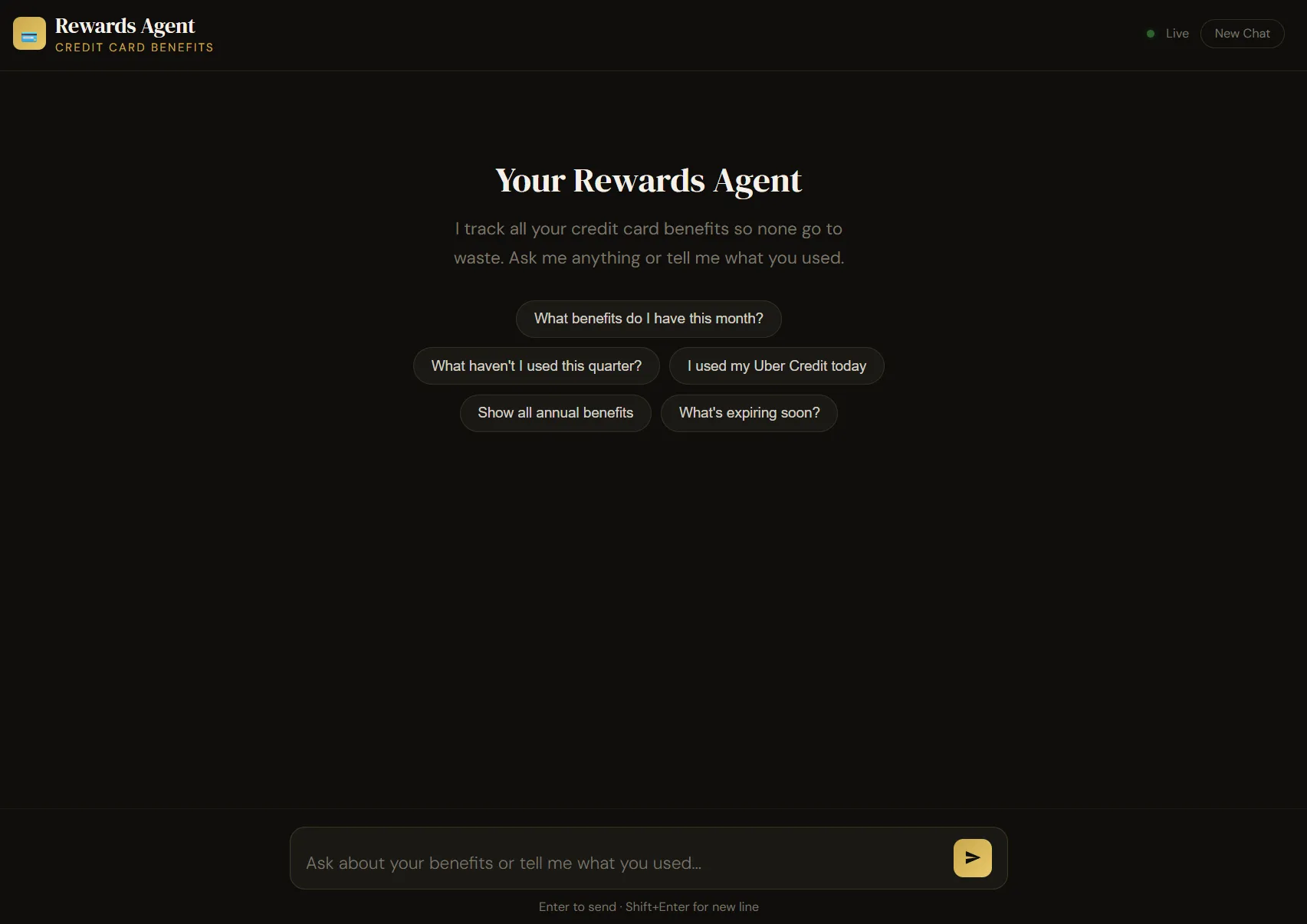
How I Built My AI Agent
At a high level, the system has three simple parts:
- A structured database (Airtable)
- An AI agent that can interpret and update that data (Claude AI)
- A simple interface to interact with it
But the real value comes from how those pieces connect.
Step 1: Building the Database in Airtable
Everything starts with structure.
I created an Airtable base that acts as the foundation of the entire system. Airtable is essentially a more flexible, user-friendly version of a spreadsheet like Excel. But instead of putting everything into one sheet, I separated the information into different tables so each piece could be tracked and connected properly.
This is something that I manually put together. I looked at every credit card and put each individual benefit into the table. It wasn’t hard, but given how nuanced all these rules for benefits are, it did take a little time to get right.
I had never heard of Airtable before or used it. So I asked chatgpt a lot about what I should do and how to create each of the different tables ensuring that it kept the focus intact. This is what it helped me create.
The Core Tables
- Cards → Each credit card (Amex Platinum, Chase Sapphire, etc.)
- Benefits → Every individual benefit tied to each card
- Usage Log → A running history of when I actually use each benefit
What you’re seeing below is the Usage Log, which is where all activity gets recorded:
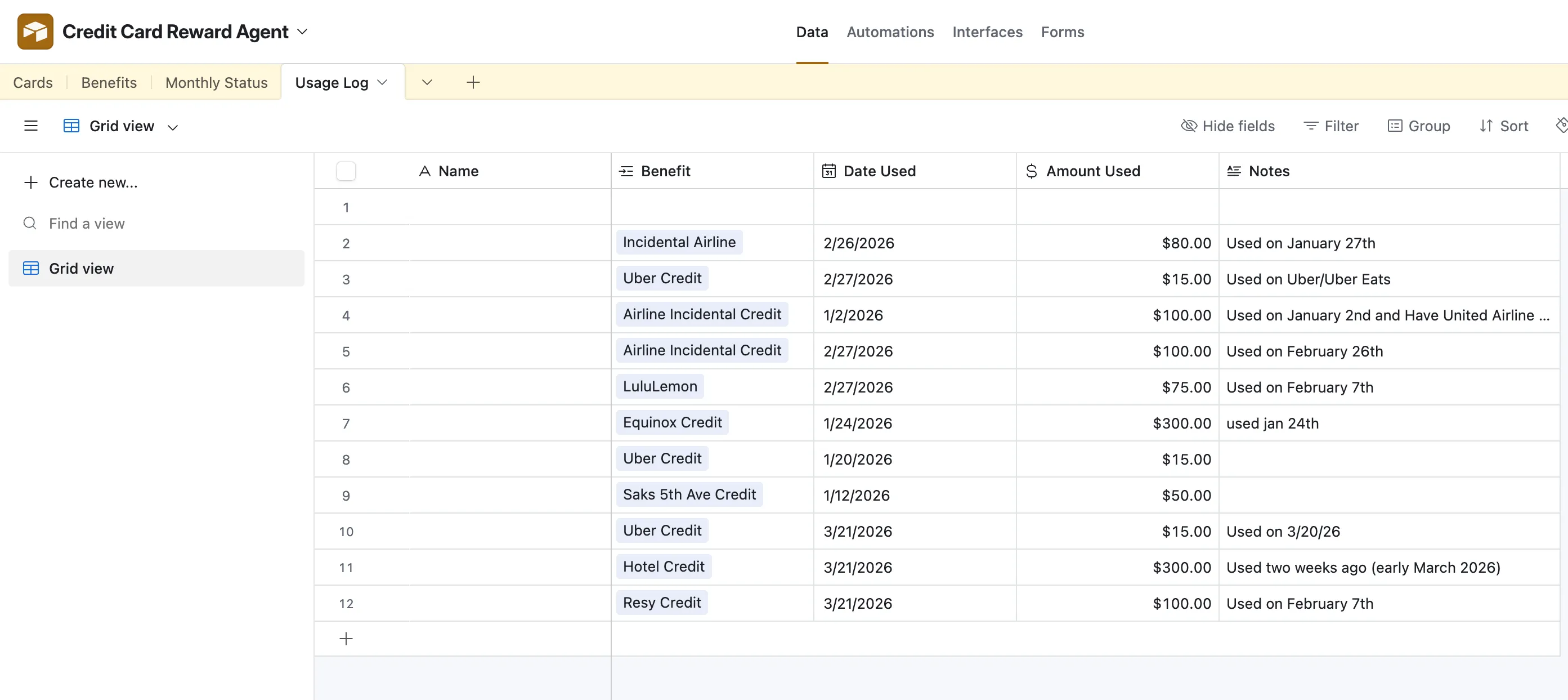
This table tracks:
- The benefit used
- The date it was used
- The dollar amount
- Notes for context
For example:
- Airline incidental credits
- Uber credits
- Hotel credits
- Saks credits
Each entry is simple, but over time it builds a full picture of usage.
How I Structured the Benefits
The real work happens in the Benefits table (behind the scenes).
Each benefit includes:
- Value (ex: $200 airline credit, $150 Chase Dining Credit)
- Cadence (monthly, quarterly, semi-annual, annual)
- Reset timing
- Associated card
This is what allows the system to “know”:
- How much should be available
- When something resets, like a monthly or semi-annual benefit
- Whether something has been used or not
Instead of tracking what’s left manually, I only log what I use. Everything else is calculated from there.
As of now, I had only been interacting with ChatGPT and it was telling me to keep everything on Airtable. The frustration started when I asked ChatGPT how to actually use the table. It kept pushing me toward building more complex systems directly inside Airtable. I spent about a full day trying to piece that together, and it quickly became more complicated than I expected.
That’s when I kept hearing about Claude Code and how it could actually write the backend for you. So I decided to switch approaches.
I asked Claude to help me build an app using Airtable, and that’s what led to it generating a full backend code in Python. It essentially walked me through the process while writing the code itself.
At the same time, it explained that the backend alone wasn’t enough. I also needed an AI agent that could interact with that code. It showed me where to set that up within Claude and $5 later, I had my own AI agent.
From there, Claude built the connection layer that allows the agent to read from and write to my Airtable. So now, I can direct my AI agent to do things on my behalf.
Step 2: Adding the AI Layer
This is where it becomes an actual “agent.”
I had Claude build a lightweight app that connects directly to Airtable through its API. That connection allows the AI to:
- Read existing data
- Write new entries
- Respond to natural language
Here’s what that looks like in practice:
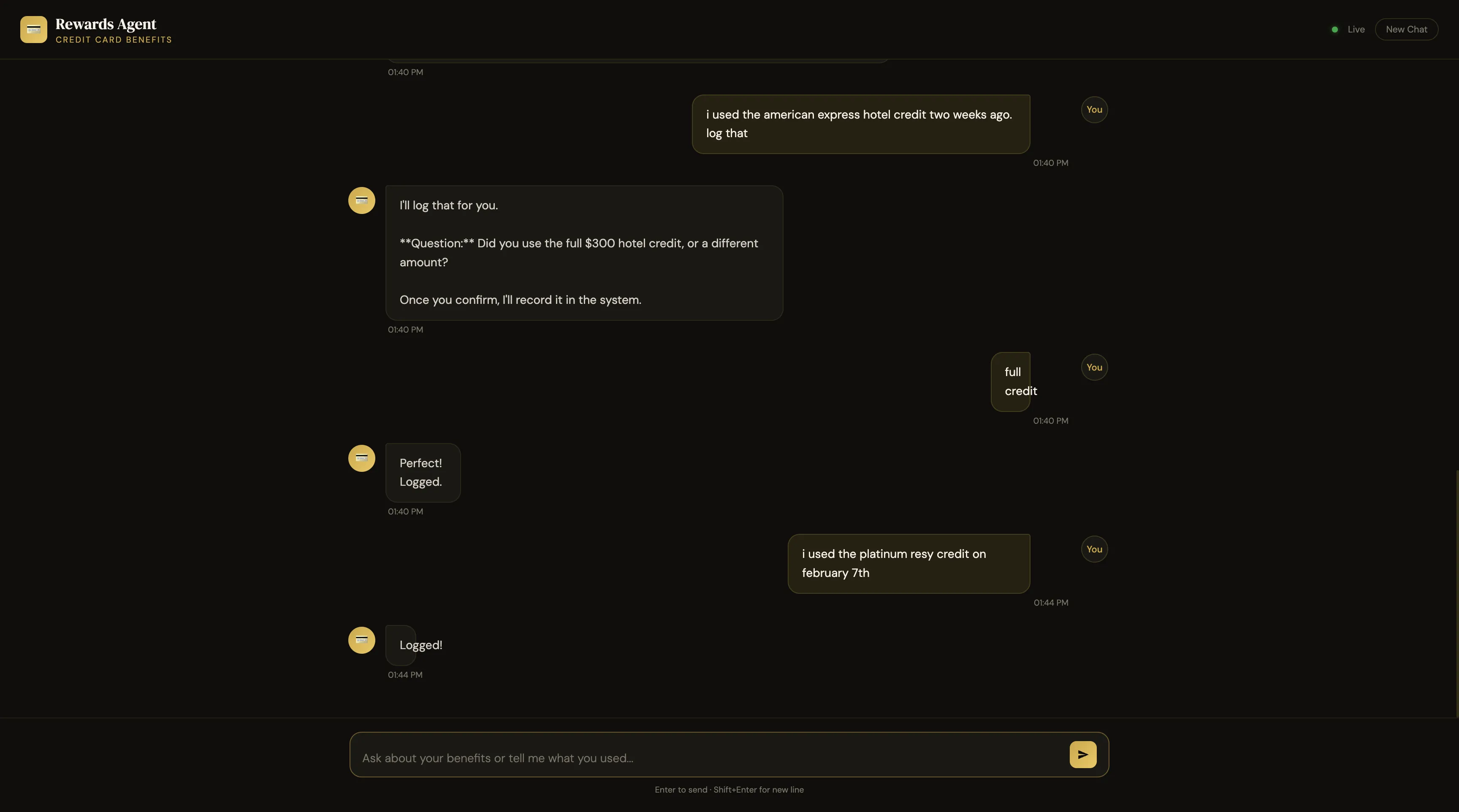
Instead of opening Airtable and manually entering data, I can just say:
“I used the American Express hotel credit two weeks ago”
The system:
- Interprets the request
- Asks a clarifying question if needed
- Logs the entry into Airtable
Then confirms: “Logged.”
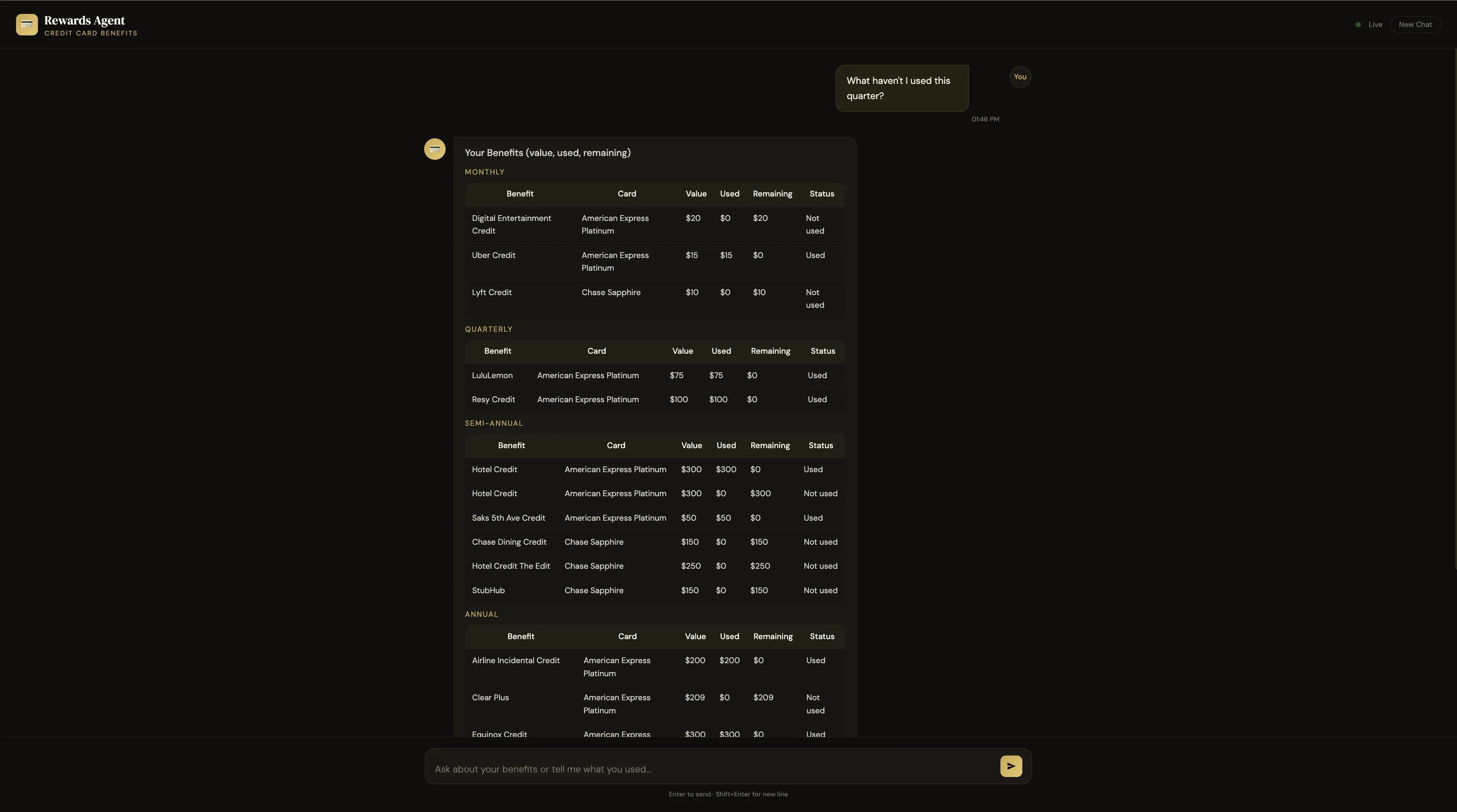
Another Example: Querying the System
This is where it really becomes useful. Instead of scanning through multiple cards or apps, I can just ask:
“What haven’t I used this quarter?”
And the system:
- Pulls data from Airtable
- Applies the reset logic
- Returns a clean summary of unused benefits
This allows me to go from viewing data to interacting with it. You’re no longer managing a spreadsheet. You’re interacting with your data.
Step 3: The Interface
The front end is intentionally simple. It’s just a clean chat interface where I can:
- Log usage
- Ask questions
- Get summaries
At the heart of it, this is all I wanted it to do. Read the information and present me all the facts back so I can ensure that I get to use all the benefits.
A Few Takeaways
This started as a small side project, but it reinforced a few important things.
- This is more accessible than people think. You don’t need a full engineering team anymore. With the right tools, you can build something practical fairly quickly.
- You have to be careful with access. I intentionally did not connect this to anything sensitive. No email, no accounts, no financial logins. Just controlled inputs. There is definitely a future where you can allow it to see your data so the AI agent can grab it itself instead of me having to log it. But that’s a project for the future.
- This is where things are going. Instead of relying on generic tools, people will increasingly build small systems tailored to their own lives. This is pretty exciting.
- Interacting with AI is not cheap. I ran through a ton of tokens early on just working on the project. I switched my claude model to a cheaper version since it wasn’t doing complex work. But the fact that there is a cost involved means that the convenience of creating this has to be worth it.
This was just a fun project and if I am really being honest with myself, I just wanted to see if I could actually do it. I can already see a ton of design errors and ways that I can make this better going forward. It’s far from a perfect complete project. But that was never the point. This is something I did in less than a few weeks. I wanted to see how far AI has come with no prior experience. Turns out its really good.
I’ve had some conversations with clients and friends who are engineers and they state that this is a huge boost to productivity. If I could do this, imagine what people who have some formal training can actually do.
I am curious, what would you do with an AI Agent?
Let's Meet!
.png)
.png)
.png)
.webp)
About the author: Nathan Lee is a CERTIFIED FINANCIAL PLANNER® and Behavioral Financial Advisor at Servet Wealth Management in New York City. He works with individuals and families navigating important financial decisions, including retirement planning, tax strategy, investing, income planning, and wealth management. Through his blog and YouTube channel, Nathan explains complex financial topics in a practical, easy-to-understand way.

I read every email and would love to hear if this blog helped you.
.png)
.png)

